
Download BB Flashback Express – Free Screen Recorder for Windows & Mac | Record Demos, Tutorials & Presentations
BB Flashback Express is a powerful yet lightweight screen recording tool designed for users who need to create professional-quality tutorials, software demos, and presentations. This free screen recording software offers intuitive controls, high-quality output, and support for multiple monitors, webcam integration, and various audio sources. Whether you're a teacher, content creator, or IT professional, BB Flashback Express makes it easy to capture your screen activity with minimal setup.
With a clean interface and step-by-step recording wizard, even beginners can produce polished videos in minutes. The software supports exporting to popular formats like AVI and Flash Video, making it ideal for sharing across platforms. While its built-in player lacks advanced editing features, its core recording capabilities shine.
Download BB Flashback Express today and start recording your screen securely, reliably, and for free.
Key Features of BB Flashback Express
BB Flashback Express stands out in the crowded field of screen recording software thanks to its smart blend of simplicity and functionality. One of its most impressive features is the step-by-step recording wizard, which guides users through every setting without overwhelming them. From selecting the recording area—whether it’s a single monitor, multiple monitors, or a specific window—to choosing the audio source (system sound, microphone, or both), the setup process is intuitive and efficient. This is especially helpful for first-time users who may not know how to configure screen capture settings properly.
The software also supports simultaneous webcam recording, allowing you to overlay your face during tutorials or presentations. This feature is invaluable for educators and remote trainers who want to add a personal touch to their content. With customizable webcam positioning and size, you can place your video feed anywhere on the screen without obstructing the main recording area. Additionally, BB Flashback Express handles multi-monitor setups seamlessly, making it perfect for users with dual or triple displays who need to capture specific workspaces or full desktop environments.
Another major advantage is the wide range of output formats. You can export recordings directly to AVI or Flash Video (FLV), both of which are widely supported across platforms and media players. The software also allows you to adjust video quality and frame rate settings, ensuring optimal file size and clarity based on your needs. For those who need to share videos quickly, the built-in upload integration with popular online services simplifies distribution. Whether you're creating training videos for your team or sharing a tutorial on YouTube, BB Flashback Express streamlines the entire workflow from capture to publish.
Installation & Usage Made Simple
Getting started with BB Flashback Express is straightforward and requires no technical expertise. The installation process is quick and clean—simply download the installer from the official website, run it, and follow the on-screen prompts. The software is lightweight, so it won’t slow down your system during recording, and it doesn’t require a powerful machine to function efficiently. Once installed, the main interface presents a minimalistic layout that focuses on usability: two primary options—Record and Open—make navigation intuitive.
To begin recording, click on “Record,” and the step-by-step wizard will appear. This wizard walks you through each setting, including the recording area (full screen, window, or custom region), audio input (system sound, microphone, or both), and video quality. You can also enable webcam recording with just a few clicks. The preview window allows you to see exactly how your final video will look, so you can make adjustments before starting. When you're ready, simply hit “Start Recording,” and BB Flashback Express begins capturing everything in real time.
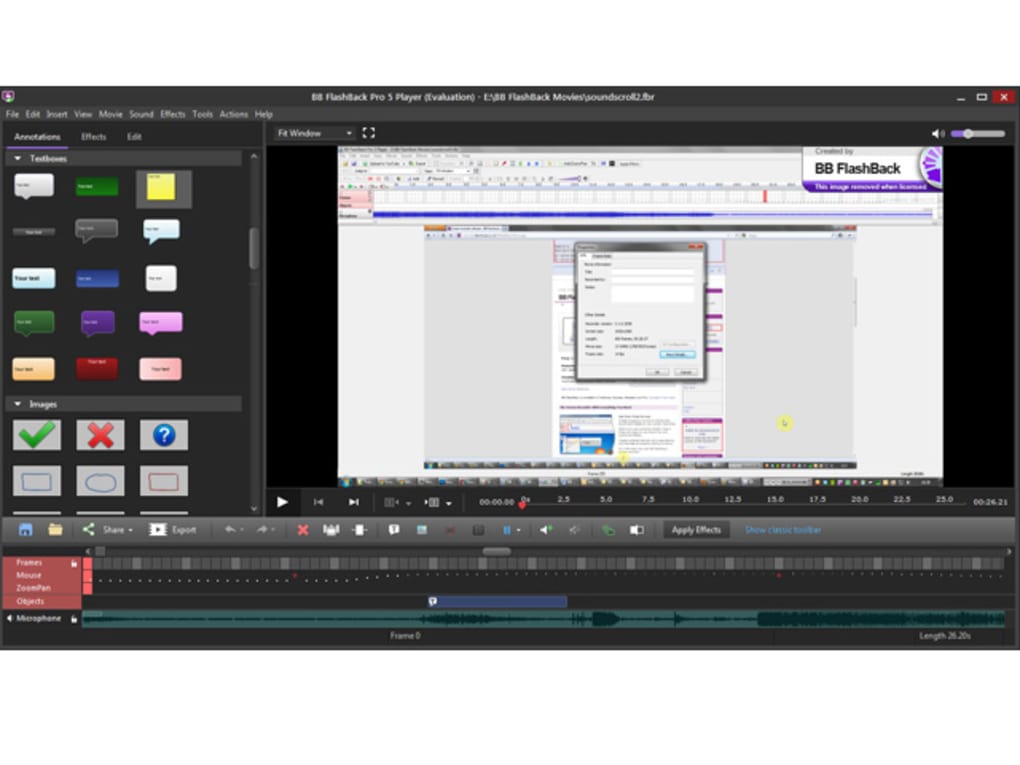
After recording ends, the software automatically saves the file and opens it in the built-in player. While the player doesn’t support advanced editing like trimming or cropping, it does allow you to apply basic visual effects, adjust volume, and view playback statistics. For users who need more editing power, the software provides a simple export option to AVI or FLV, which can then be imported into third-party video editors like Adobe Premiere or DaVinci Resolve. The entire process—from setup to export—can be completed in under five minutes, making BB Flashback Express ideal for quick, on-the-go recordings.
Compatibility & System Requirements
BB Flashback Express is designed to run smoothly on a wide range of systems, making it accessible to most users. It is compatible with Windows 7 and later versions, including Windows 10 and Windows 11, ensuring broad support across both personal and professional environments. For Mac users, a version is available for macOS 10.12 and above, offering the same core functionality across platforms. This cross-platform availability makes it a versatile choice for teams using mixed operating systems.
The software is optimized for performance, with low CPU and memory usage during recording sessions. It supports multi-monitor configurations, allowing users to record specific screens or the entire display setup. This is particularly useful for professionals managing complex workflows across multiple displays. Additionally, BB Flashback Express supports a variety of audio devices, including USB microphones, built-in mics, and external audio interfaces, ensuring high-quality sound capture for tutorials and presentations.
For those concerned about security, BB Flashback Express is a free, ad-free, and malware-free application distributed directly from the official developer site. There are no hidden toolbars, no tracking software, and no bundled third-party apps. This ensures a safe and reliable recording experience. The software also receives regular updates to fix bugs, improve stability, and enhance compatibility with new operating system releases. Whether you're recording a software demo, a gaming session, or a virtual meeting, BB Flashback Express delivers consistent performance across all supported platforms.
Pros and Cons of BB Flashback Express
- Pros:
- Free to download and use with no time limits
- Simple, intuitive interface ideal for beginners
- Step-by-step recording wizard for hassle-free setup
- Supports multi-monitor and webcam recording
- Exports to AVI and FLV formats for easy sharing
- Lightweight with minimal system resource usage
- Regular updates and stable performance
- Cons:
- Limited editing capabilities in the built-in player
- No built-in trimming, cropping, or splitting tools
- Only supports AVI and FLV export (no MP4 or MOV)
- No advanced effects or transitions
- Mac version has fewer features compared to Windows
Frequently Asked Questions (FAQ)
-
Is BB Flashback Express free to use?
Yes, BB Flashback Express is completely free to download and use. There are no time limits, watermarks, or hidden fees. The software is available for both Windows and Mac users, making it an excellent choice for students, educators, and professionals who need a reliable screen recorder without cost.
-
Can I record my webcam along with my screen?
Absolutely. BB Flashback Express allows you to record your webcam footage simultaneously with your screen activity. You can position the webcam window anywhere on the screen and adjust its size, making it perfect for creating face-to-face tutorials or personal presentations.
-
What formats can I export my recordings to?
The software supports exporting recordings to AVI and Flash Video (FLV) formats. While it doesn’t offer MP4 or MOV exports natively, these files can be easily converted using free tools like HandBrake or VLC Media Player.
-
Does BB Flashback Express support multiple monitors?
Yes, BB Flashback Express fully supports multi-monitor setups. You can choose to record the entire desktop, a specific monitor, or a custom region across multiple screens—ideal for users with dual or triple displays.
-
Is there a paid version with more features?
Yes, BB Flashback All-in-One is the premium version that includes advanced editing tools, video publishing, and additional output formats. However, the free Express version remains powerful for basic screen recording needs.
Final Verdict & Call to Action
BB Flashback Express is one of the best free screen recording tools available today. While it may lack advanced editing features, its core recording capabilities are top-notch—offering high-quality video, multi-monitor support, webcam integration, and easy export options. It’s perfect for creating tutorials, software demos, online lessons, and quick presentations without the complexity of professional video editing software.
If you're looking for a secure, lightweight, and reliable way to record your screen on Windows or Mac, BB Flashback Express delivers exactly what it promises. Download it now and start creating engaging, professional content—no strings attached.
Download BB Flashback Express today and take control of your screen recording needs—free, fast, and hassle-free.







